

Playbooks
Playbooks are the foundation of your vendor due diligence process in Clarative. They define the criteria, controls, and questions used to assess vendor compliance with your organization's security and risk requirements.
What is a Playbook?
Section titled “What is a Playbook?”A playbook is a reusable collection of assessment criteria organized into sections that evaluate whether a vendor meets your organization’s risk management standards. Think of it as your vendor assessment blueprint—defining what “good” looks like for your organization.
Playbooks enable you to:
- Standardize assessments across different vendors and teams
- Scale your due diligence process with AI-powered automation
- Maintain consistency in how you evaluate vendor risk
- Customize requirements based on vendor type, use case, or risk domain
- Leverage industry frameworks and regulatory guidance like MVSP, NIST, OWASP, DORA, OCC, NYDFS and more
Organizations typically maintain multiple playbooks for different scenarios, such as:
- High-risk vs. low-risk vendors
- SaaS vendors vs. consulting firms
- Data processors vs. sub-processors
- Domain-specific assessments (security, privacy, compliance)
Playbook Anatomy
Section titled “Playbook Anatomy”Understanding the structure of a playbook helps you build effective assessments.
Sections
Section titled “Sections”Sections organize your playbook into logical risk domains or control categories.
Sections help reviewers navigate the assessment and allow you to focus on specific risk areas.
Criteria
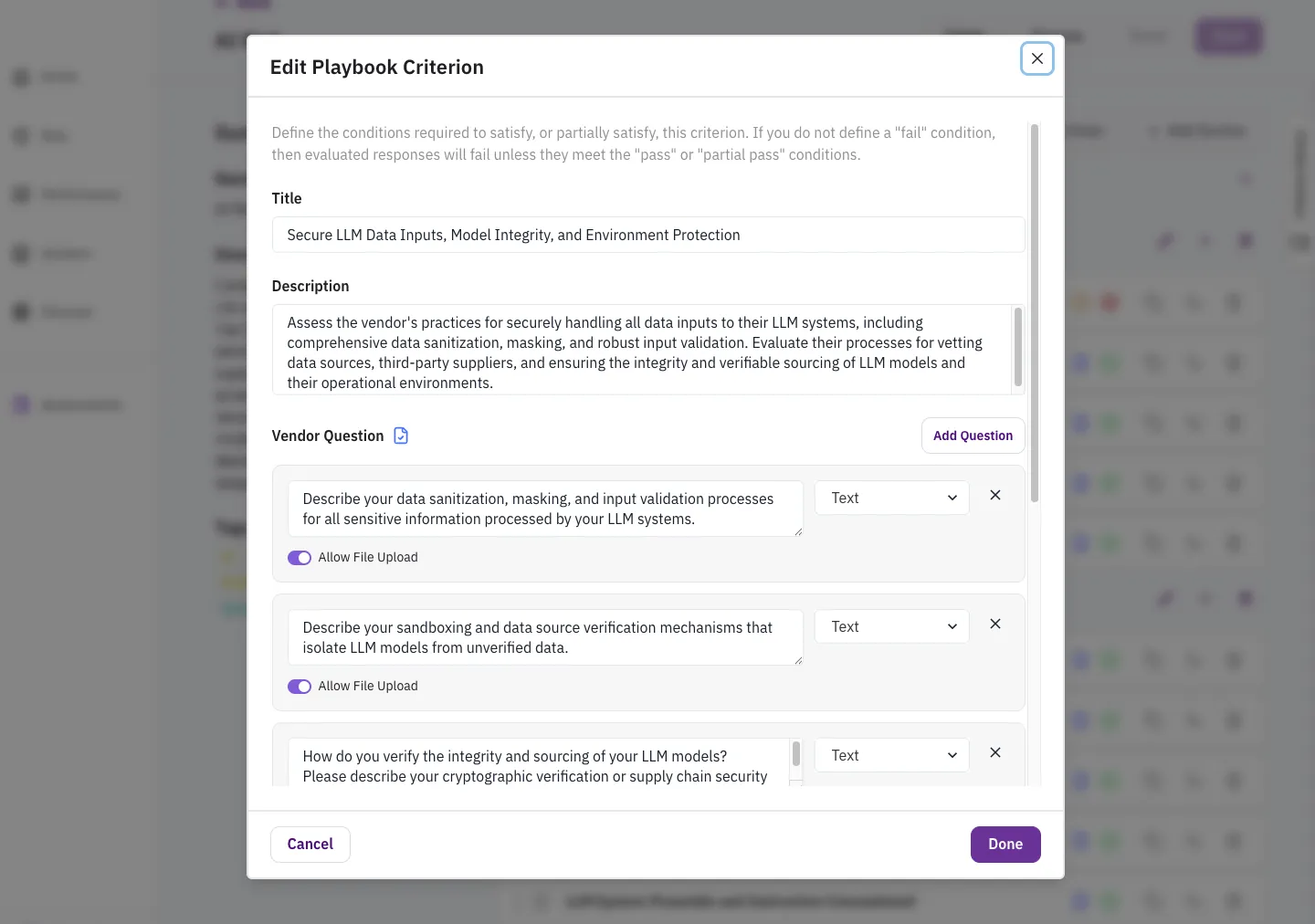
Section titled “Criteria”Criteria are the individual requirements that determine vendor compliance. Each criterion represents a specific control or policy you expect the vendor to have in place.
A criterion includes:
- Title: A clear, descriptive name (e.g., “Single Sign-On (SSO) Capability”)
- Pass/Partial Pass/Fail Instructions: Detailed conditions that define what constitutes compliance
Questions
Section titled “Questions”Questions are used to gather information from vendors that may not be available in their documentation. Each criterion can have multiple associated questions.
Questions appear in the Vendor Portal when you send a questionnaire to the vendor. They should:
- Request specific information needed to evaluate the criterion
- Be clear and unambiguous
- Avoid asking for information already in standard documents (like SOC 2 reports)
- Guide vendors to provide evidence in a structured format
Creating a Playbook
Section titled “Creating a Playbook”Clarative offers three ways to create playbooks, each suited to different workflows.
Method 1: Upload an Existing Questionnaire
Section titled “Method 1: Upload an Existing Questionnaire”If you already have vendor questionnaires or vendor requirement policies in Excel, Word, or PDF format, you can upload them to generate a playbook automatically.
- Navigate to Playbook Library
- Click Create Playbook → Upload Policies
- Upload your file
- Clarative’s AI extracts questions and generates criteria
- Review and refine the generated playbook
Best for: Migrating existing assessment templates to Clarative quickly.
Method 2: Start from a Template
Section titled “Method 2: Start from a Template”Clarative provides pre-configured playbook templates based on common frameworks and regulatory requirements.
Available templates include:
- Default Security - Based on the Minimal Viable Secure Product (MVSP) guidelines published by Google, Salesforce, Okta, and others, as well as NIST standards
- Privacy - Based on common privacy requirements from regulations like GDPR and CCPA
- AI/ML Risk - Based on OWASP’s LLM security guidelines
- DORA ICT - Based on due diligence requirements from the DORA regulations
How it works:
- Navigate to Playbook Library
- Click Create Playbook → Start from Template
- Select a template
- Customize sections, criteria, and questions to your needs
Best for: Starting with industry-standard frameworks and tailoring to your requirements.
Method 3: Build from Scratch
Section titled “Method 3: Build from Scratch”For complete control, create a playbook from the ground up.
How it works:
- Navigate to Playbook Library
- Click Create Playbook → Start from Scratch
- Add sections to organize your assessment
- Add criteria using the Criteria Library or create custom criteria
- Configure pass/fail conditions and add questions
Best for: Highly specialized assessments or unique organizational requirements.
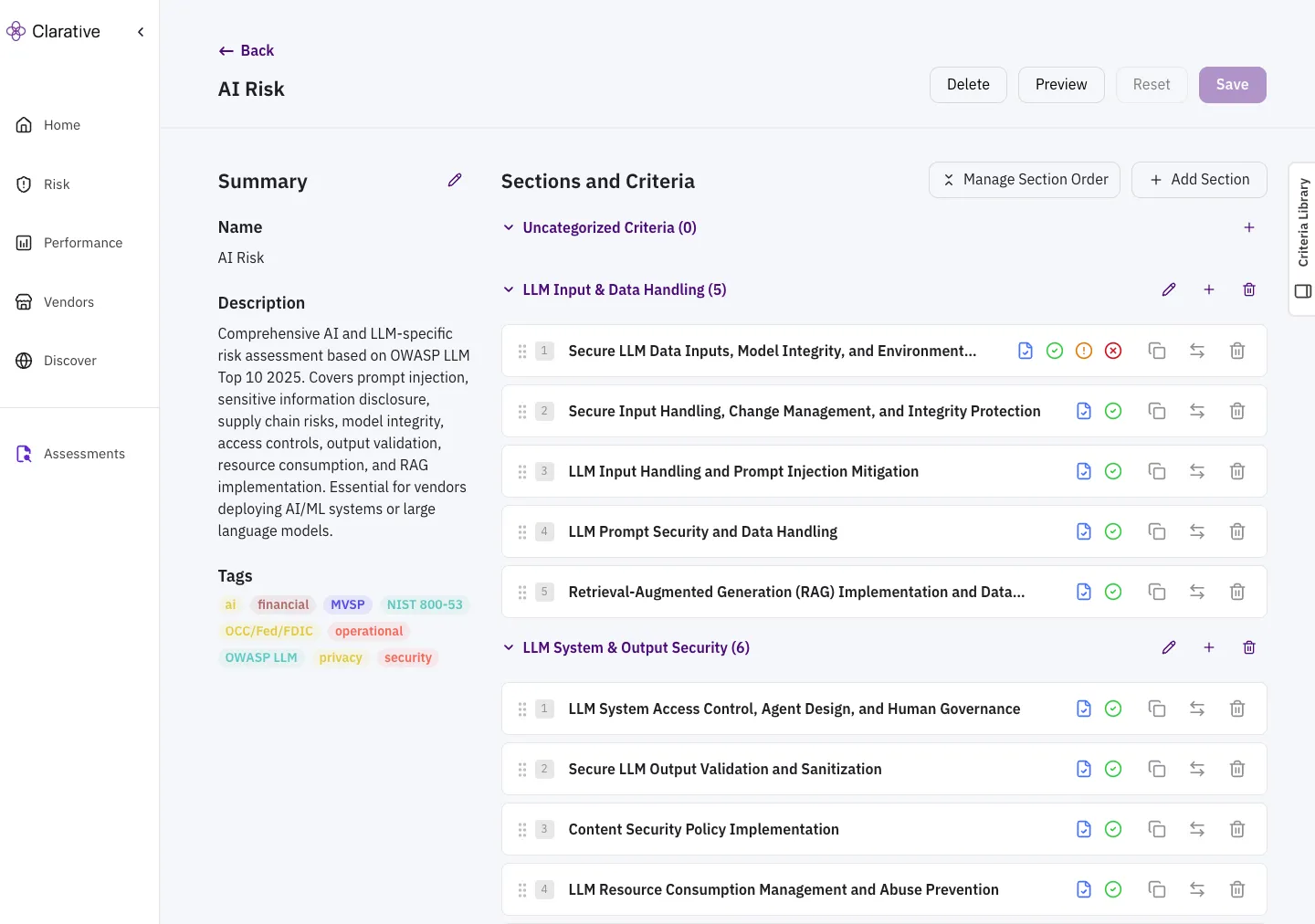
The Criteria Library
Section titled “The Criteria Library”The Criteria Library is Clarative’s repository of pre-built, industry-standard criteria that you can add to your playbooks. It includes criteria mapped to major frameworks like NIST, regulations like DORA, and guidance from regulatory agencies like OCC and NYDFS.
How to use:
- When editing a playbook, click Criteria Library in the right sidebar
- Search the Criteria Library by keyword, framework tag, or risk domain
- Select relevant criteria to add to your playbook
- Customize as needed for your specific requirements
Best Practices for Writing Playbooks
Section titled “Best Practices for Writing Playbooks”Creating effective playbooks requires balancing comprehensiveness with practicality. Follow these guidelines to build playbooks that deliver accurate, efficient assessments.
- Be Specific: Define specific criteria that a vendor must fulfill to meet your organization’s risk management bar. “Vendor supports SSO via OIDC and SAML 2.0” is a more verifiable criterion than “Vendor authentication is secure”.
- Clear Instructions: Write instructions that are specific and actionable to ensure consistent AI classification.
- Use Questions Where Documentation is Insufficient: Criteria prompts are great for assessing documentation, but you may need risk information that requires asking questions. Include questions like “Have you had a security breach in the last 6 months?” to gather risk information that will not be included in documentation.
- Update Regularly: As your risk appetite changes, or as you request new types of evidence, regularly update your playbooks.
Examples
Section titled “Examples”-
Access & Identity Management
-
Comprehensive Access Management Lifecycle- Criterion:
The vendor provides clear policies and procedures for user and service account provisioning, modification, and revocation, demonstrating formal authorization, least privilege enforcement, and accurate logging of all changes. Evidence includes documented access approval workflows, role-based access configurations, regular access review reports showing timely remediation of unneeded access, and audit logs confirming deactivation for terminated accounts within defined SLAs. The process should integrate security posture changes and ensure technical enforcement of controls.
- Quesion:
Describe your processes and controls for user and service account provisioning, modification, and deactivation, including how you enforce least privilege and separation of duties. Please provide relevant policy or procedure documents.
- Criterion:
-
Strong Authentication & Multi-Factor Authentication for User Access- Criterion:
The vendor provides clear documentation (policies, security configurations, audit reports) demonstrating mandatory multi-factor authentication (MFA) for all remote access, privileged user access, administrative access, and access to sensitive data. Evidence should confirm the consistent application of strong authentication requirements across all access methods (e.g., local, network, remote) for all personnel, utilizing at least two distinct authentication factors.
- Question::
Do you enforce mandatory multi-factor authentication (MFA) for all remote access, privileged user access, administrative access, and access to sensitive data?
- Criterion:
-
Single Sign-On (SSO) Capability-
Criterion:
The vendor’s offering must provide robust SSO capabilities, allowing customers to integrate with standard federated identity providers. This functionality should empower customers to enforce their own security policies, such as multi-factor authentication and centralized account deactivation. Crucially, SSO should be offered as a standard feature without any additional cost to the customer. Evidence should include official documentation detailing SSO support, a list of compatible identity providers, and explicit confirmation of its no-cost inclusion.
-
Question:
Does your product or service support Single Sign-On (SSO) integration with standard federated identity providers as a standard feature at no additional cost?
-
Question:
Which SSO protocols are supported?
-
-
Maintain and Iterate
Section titled “Maintain and Iterate”Playbooks are living documents. Update them as:
- Your risk requirements change
- New threats emerge
- Frameworks are updated
- You learn what works from past assessments
Recommended: Review playbooks quarterly and after every 5-10 assessments to identify improvement opportunities.
Tagging and Organization
Section titled “Tagging and Organization”Use tags to organize playbooks in the Playbook Library for easy discovery and reuse.
Common tag categories:
-
Framework/Regulation: NIST, DORA, NYDFS
-
Risk Level: High-Risk, Medium-Risk, Low-Risk
-
Vendor Type: SaaS, Infrastructure, Consulting
-
Domain: Security, Privacy, Compliance, Finance
Need Help?
Section titled “Need Help?”Contact support at support@clarative.ai.