

Dora Quick Start
Get your Third-Party Risk Management (TPRM) program DORA-compliant in 6 simple steps using Clarative's third-party risk AI Automation Engine.
Overview
Section titled “Overview”The Digital Operational Resilience Act (DORA) requires EU financial institutions to perform due diligence on ICT third-parties and continuously monitor ICT third-party relationships against specific SLAs and KPIs. DORA mandates both traditional periodic vendor risk reviews reviews and ongoing, real-time oversight with comprehensive audit trails.
Key DORA requirements:
- Detailed due diligence on all ICT third-party service providers before entering into any contract (DORA RTS Article 6)
- Risk-based ICT assesssment framework (DORA RTS Article 5)
- Continuous monitoring of vendor performance against SLAs and KPIs (DORA RTS Article 9)
- Real-time risk event detection and response (DORA Articles 10-11, 17-18)
- Key contractual provisions like exit strategies, termination rights, SLAs, KPIs, and data protection (DORA Article 30)
- Comprehensive audit trails and compliance reporting
This guide walks you through setting up automated DORA compliance using Clarative’s platform. In this guide you will:
- Automate Vendor Due Diligence
- Automate SLA and KPI Monitoring
- Automate Vendor Risk and Performance Reporting
- Identify Contracts That Are Missing Required DORA Clauses
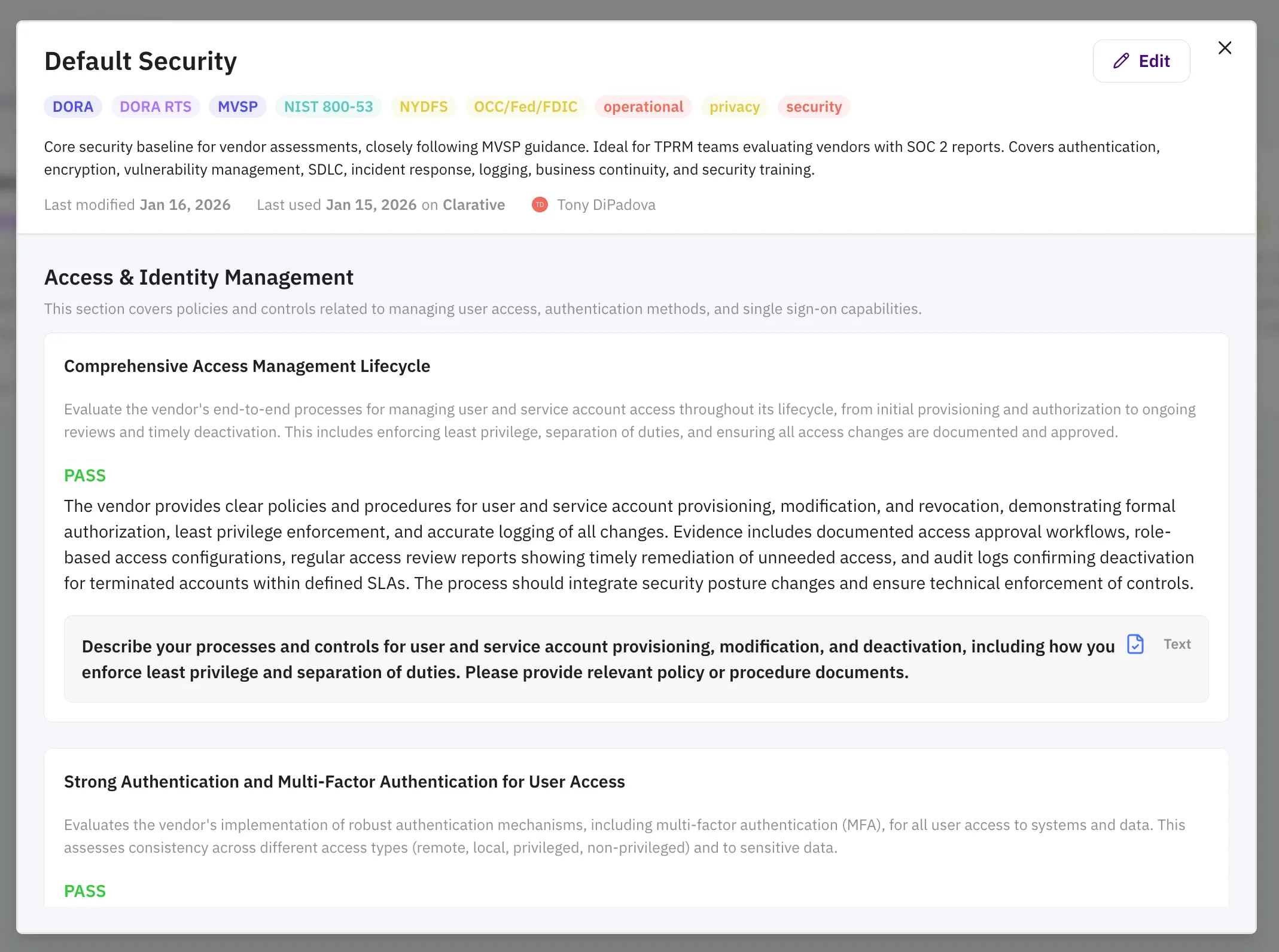
Step 1: Set Up Your Vendor Assessment Playbooks
Section titled “Step 1: Set Up Your Vendor Assessment Playbooks”Create playbooks to define vendor requirements during risk assessments.
- Navigate to the Assessments tab in the sidebar. Click Playbook Library to open the Playbook Library.
- Click Create Playbook to create a new playbook. You can upload an existing vendor questionnaire, choose from one of our standard templates (such as our security template or our DORA ICT template), or start from scratch.
- Click on your new playbook and click “Edit” to customize the playbook to your needs.
Now you’re ready to kickoff automated vendor assessments in the Assessments tab. Just create a new assessment and upload the relevant documentation. See the Due Diligence Quick Start for details.
Step 2: Set Up Your SLA Registry
Section titled “Step 2: Set Up Your SLA Registry”Create a centralized registry of all vendor SLAs, KPIs, and performance obligations. The Clarative team can complete this step for you.
What you’ll need
Section titled “What you’ll need”- Vendor contracts and service agreements
- List of critical ICT vendors and services
Onboard Your Vendors
Section titled “Onboard Your Vendors”Navigate to Vendors and add a new vendor or let the Clarative team onboard for you. Contact support@clarative.ai for assistance in onboarding new vendors.
Create SLAs with AI, with Clarative Presets, or Manually
Section titled “Create SLAs with AI, with Clarative Presets, or Manually”-
Click a vendor to go to the vendor detail page and open the Performance Monitoring tab
-
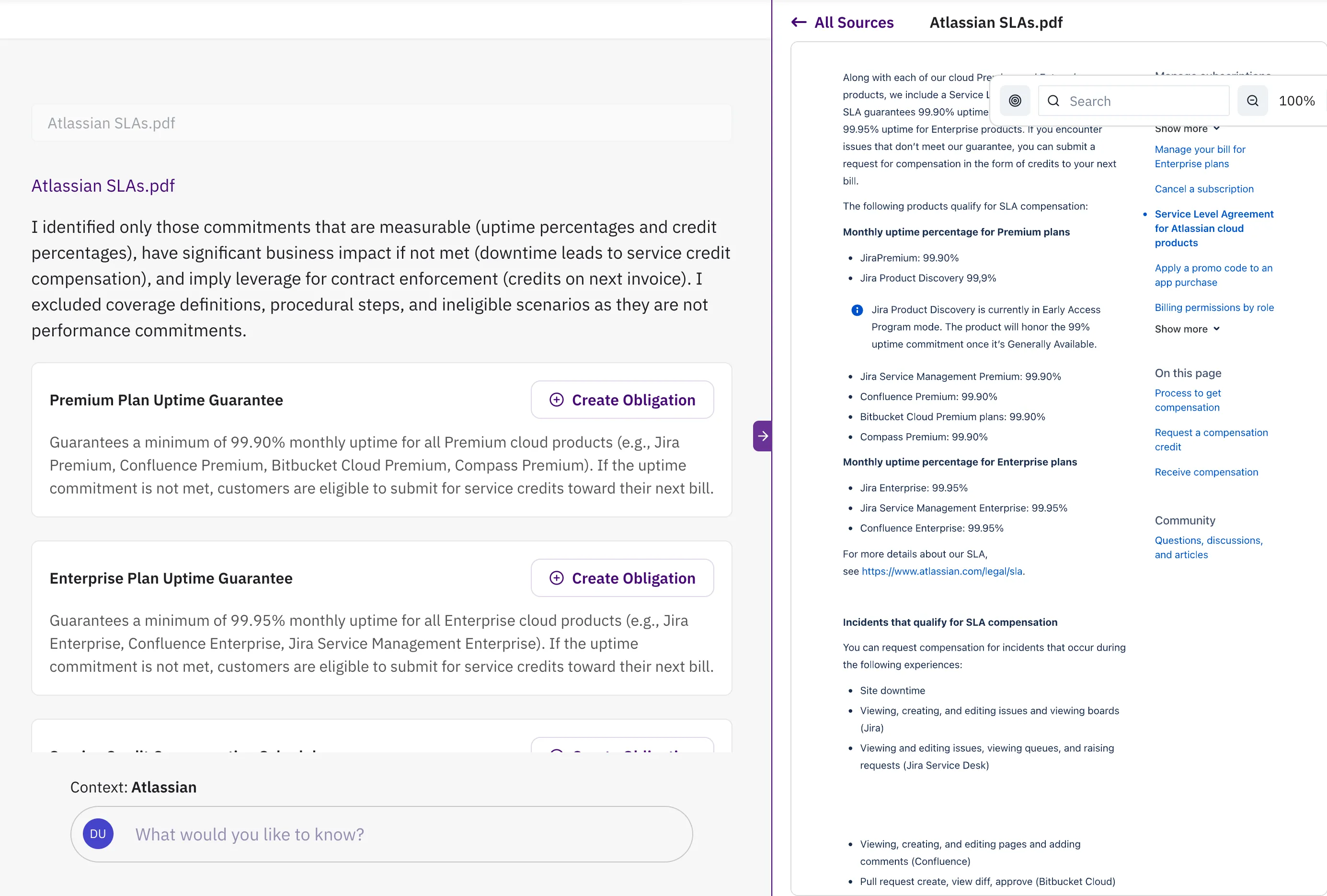
If you have uploaded SLA documentation, click Extract with AI to extract SLAs, KPIs, and important vendor obligations
a. Review AI-identified SLAs (uptime targets, response times, performance metrics)
b. Validate and approve extracted SLAs
-
If you have not uploaded SLA documentation, click “Add” to add a new SLA. You can select from pre-configured SLAs if available, or configure your own SLA.
-
Assign owners to SLAs
-
Configure monitoring parameters for each SLA
Result
Section titled “Result”A comprehensive registry of all vendor SLAs with automated monitoring ready to activate.
Step 3: Configure Risk Data Sources
Section titled “Step 3: Configure Risk Data Sources”Enable continuous monitoring by connecting Clarative to multiple risk data sources. If you select a Clarative-supported vendor from the search field during vendor onboarding, most risk data sources are configured for you automatically.
Available data sources:
Section titled “Available data sources:”- Incident Reports: Public status pages and vendor notifications
- Security Breach Reports: CVE feeds and security advisories
- Regulatory Filings: SEC filings and regulatory announcements
- Adversarial News: Media monitoring for negative vendor coverage
- Synthetic Monitoring: Uptime and performance testing
- Vendor Data Requests: Automated questionnaires and data collection
- Internal Integrations: Connect your monitoring tools (Datadog, Splunk, etc.)
Configure Incident Monitoring
Section titled “Configure Incident Monitoring”- Open an SLA from the vendor Performance Monitoring tab, or create a new one and select “Uptime SLA”.
- Click Configure SLA and go to the Tags tab.
- Select the relevant Products, Services, and Regions for the SLA.
Configure Synthetic Monitoring (Heartbeat)
Section titled “Configure Synthetic Monitoring (Heartbeat)”-
Click “Add” under Synthetic Monitoring on the vendor Performance Monitoring tab, or select a preconfigured monitor template from the list.
-
Configure the monitor to your specifications and test the monitor.
-
Click “Activate” on the monitor page to start monitoring.
See more details on the Synthetic Monitoring page.
Configure Custom (Vendor Data Collection) SLAs
Section titled “Configure Custom (Vendor Data Collection) SLAs”- Click “Add” in the vendor Performance Monitoring tab to create a new SLA, and then select Custom SLA.
- Name the SLA metric you want to measure and enter the ideal (green) and acceptable (yellow) value ranges.
- Configure the vendor contact that is responsible for providing the metric, and the cadence to send automated email reminders.
Step 4: Set Up AI Risk Rules
Section titled “Step 4: Set Up AI Risk Rules”Automate risk event prioritization to focus on the most critical issues first.
In Clarative
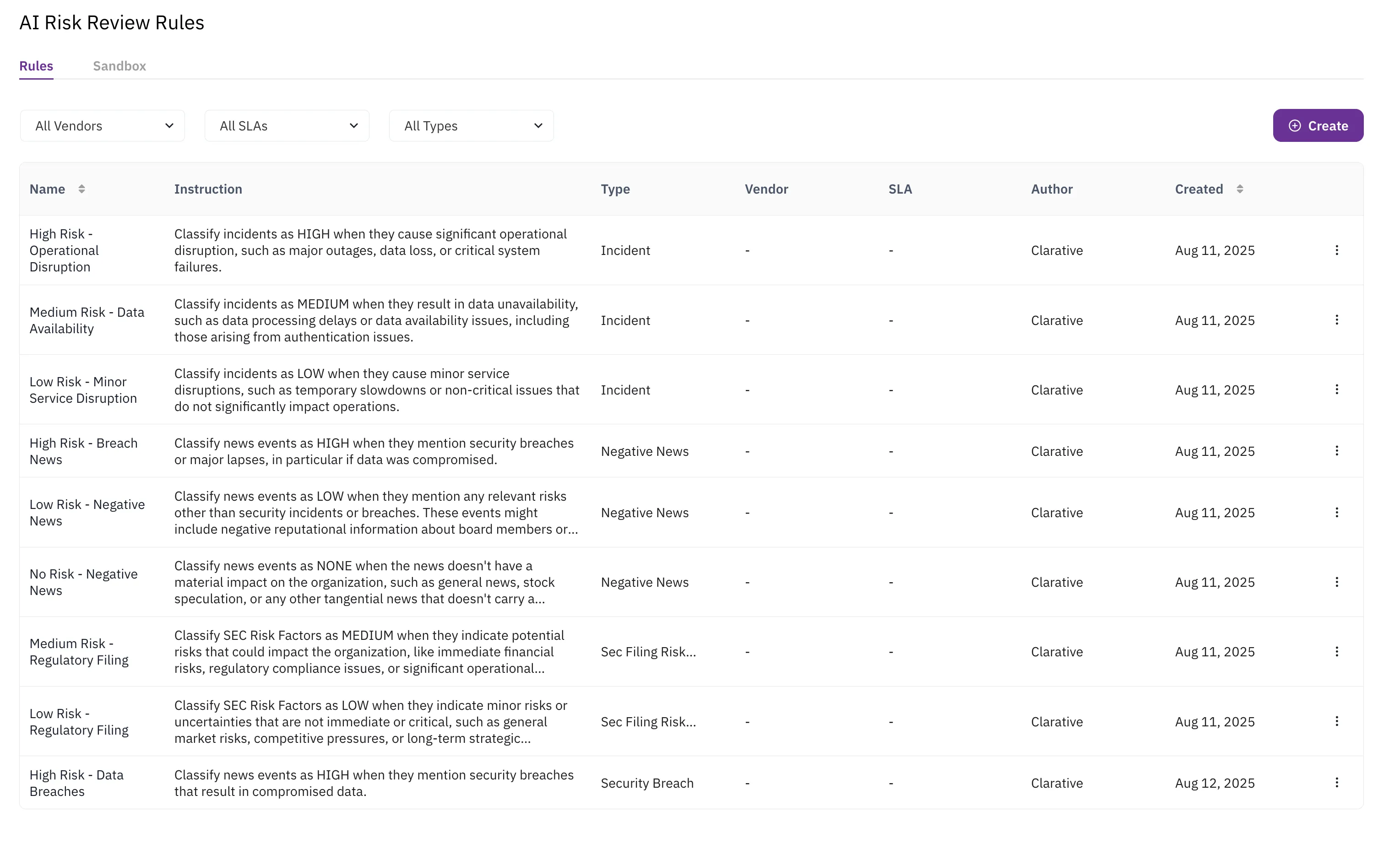
Section titled “In Clarative”- Navigate to AI Risk Rules by first going to the Risk tab and clicking Configure AI Triaging
- Create rules by:
- Event Type: Different rules for incidents vs. security breaches
- Vendor: Custom rules for specific vendors
- SLA Specific: Targeted rules for particular SLAs
Example rule configurations
Section titled “Example rule configurations”- High Priority: Significant operational disruptions such as major outages, critical system failures, or data loss
- Medium Priority: Data unavailability caused by processing delays or other availability issues
- Low Priority: Temporary slowdowns or non-critical issues that do not impact operations
Result
Section titled “Result”AI automatically triages incoming risk events, ensuring your team focuses on DORA-relevant issues while maintaining complete audit trails.
Step 5: Find Non-Compliant Contracts with Search Grid
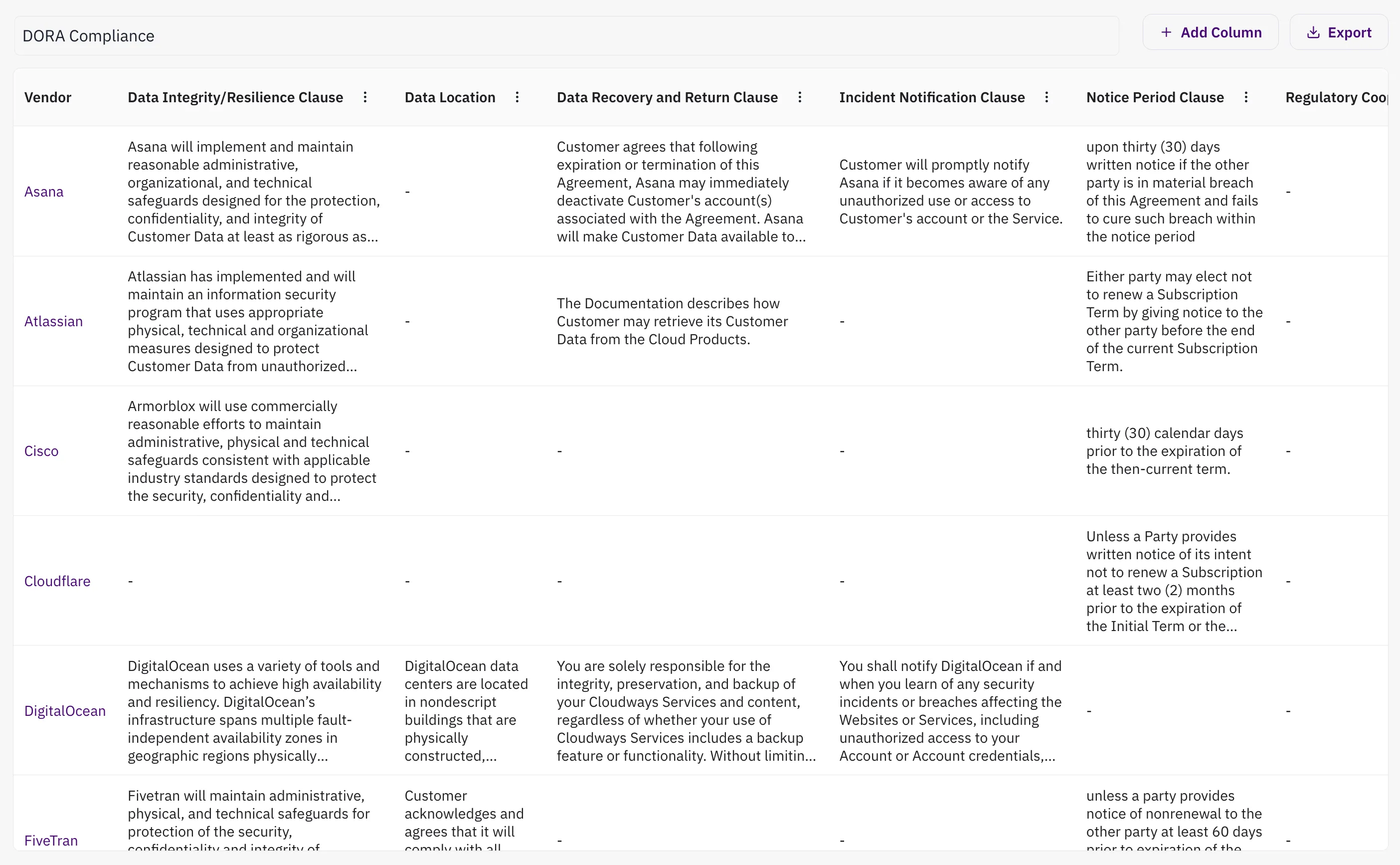
Section titled “Step 5: Find Non-Compliant Contracts with Search Grid”Use AI to identify missing DORA clauses across your contract portfolio and prioritize remediation efforts with Search Grid.
Required DORA clauses to search for:
Section titled “Required DORA clauses to search for:”- Audit rights
- Data integrity/resilience provisions
- Incident notification requirements
- Subcontractor approval clauses
- Termination rights
In Clarative:
Section titled “In Clarative:”- Navigate to Discover (globe icon in sidebar)
- Ensure you’re searching across All Vendors
- Click DORA Compliance from the template options
- Review the Table Preview showing all DORA clause types
- Click Generate Table to create your clause matrix
Take action:
Section titled “Take action:”- Export the clause table for your legal team
- Prioritize remediation by:
- Vendor criticality (focus on ICT-critical vendors first)
- Contract renewal dates (combine with upcoming renewals)
- Risk exposure level
Result:
Section titled “Result:”A comprehensive audit of DORA compliance across all vendor contracts.
Step 6: Monitor Performance and Generate Reports
Section titled “Step 6: Monitor Performance and Generate Reports”Track vendor performance against SLAs and maintain compliance reporting.
Real-time monitoring
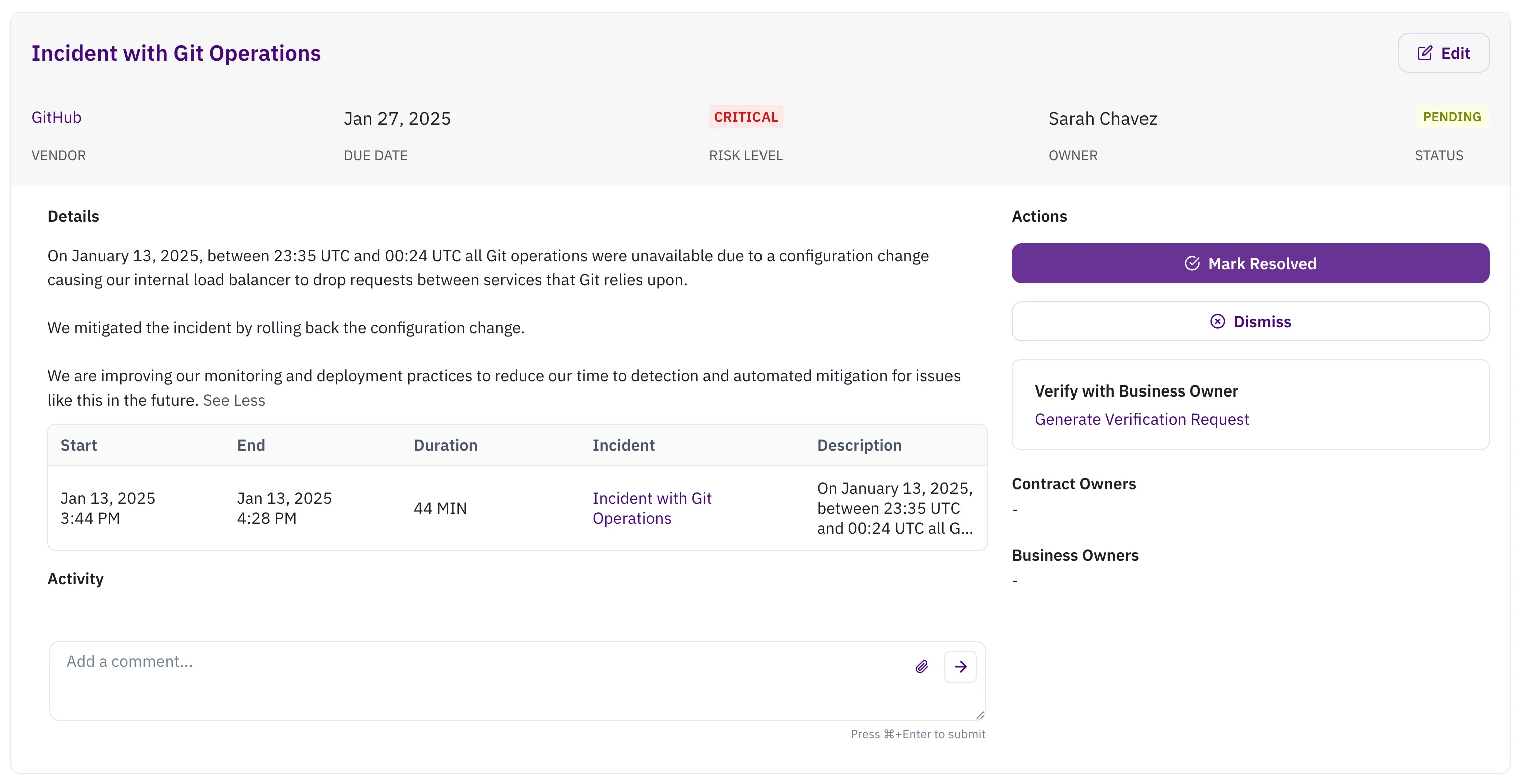
Section titled “Real-time monitoring”- Access the Risk tab to see all active risk events
- Click into individual events to see:
- AI triage explanation and reasoning
- Full context and relevant SLA impact
- Click Generate Verification Request to send risk event details to a subject matter expert or business owner for review and response
- All actions are logged in the activity trail for audit purposes
- Close the risk event as resolved or dismiss it
SLA performance tracking
Section titled “SLA performance tracking”- Click on any vendor to view their SLA Detail page from the Performance Monitoring tab
- Monitor performance against specific SLAs:
- Uptime percentages vs. commitments
- Incident impact summaries with business context
- Historical performance trends
- Identify potential SLA violations with supporting incident data
Compliance reporting
Section titled “Compliance reporting”Clarative provides real time risk and compliance reporting as well as exportable SLA reports.
Risk Reporting
- Navigate to Performance tab for executive dashboards
- Track key DORA metrics:
- Risks Identified: Events detected by continuous monitoring
- Coverage Metrics: Number of vendors and SLAs actively monitored
SLA Reporting
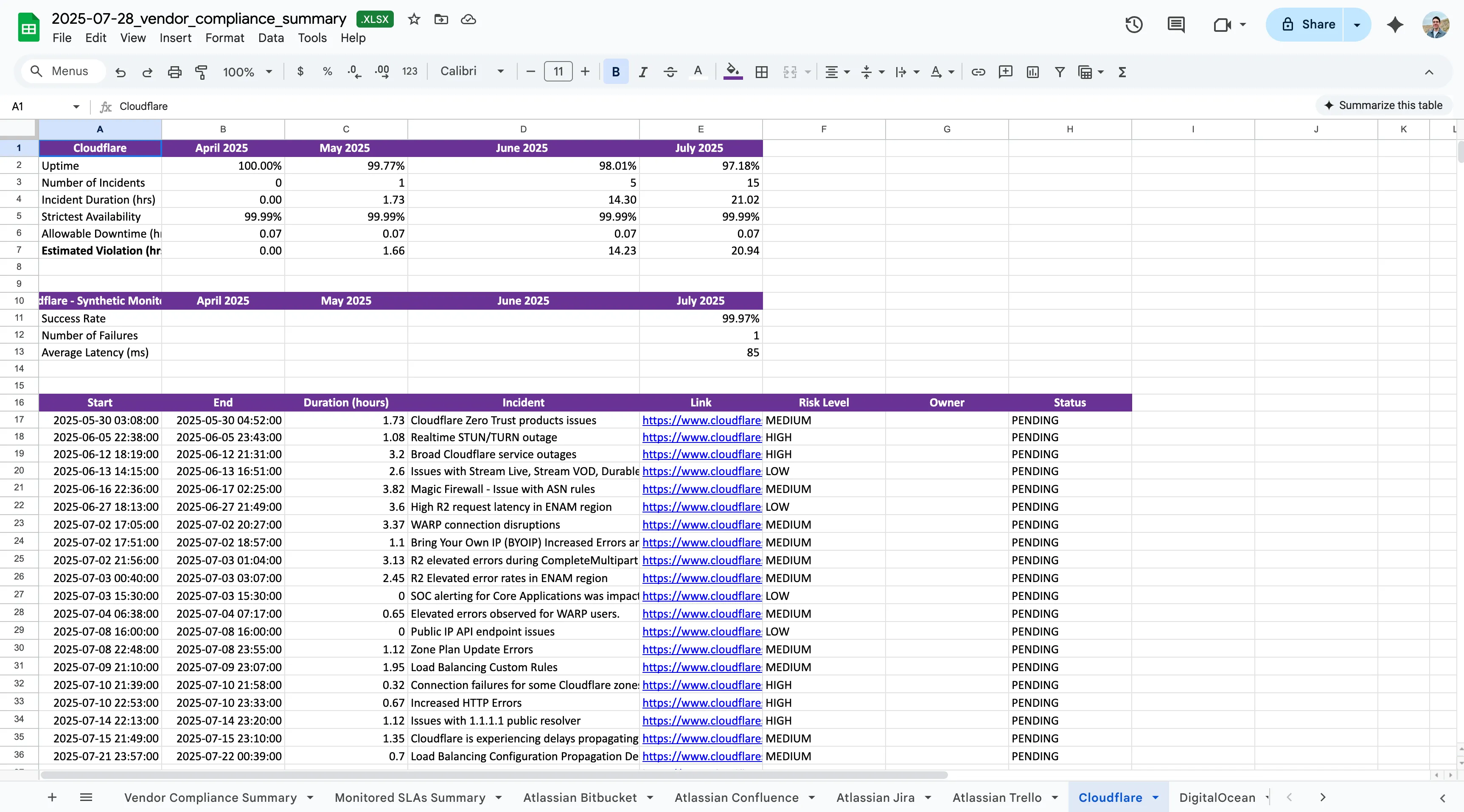
- Export SLA compliance reports for multiple with the Export Report button on the Vendors tab.
- Export detailed vendor SLA reports by clicking Export Report on a specific SLA.
Result:
Section titled “Result:”Shareable reports on vendor SLA compliance, availability, and risk event mitigation.
Maintaining DORA Compliance
Section titled “Maintaining DORA Compliance”Regular reviews
Section titled “Regular reviews”- At Vendor Onboarding: Perform due diligence assessments for all vendors
- Weekly: Monitor the Review tab for new risk events
- Monthly: Analyze vendor performance trends
- Quarterly: Update AI risk rules and SLA thresholds
- Annually: Perform periodic reassessmetns of your critical vendors
Audit preparation
Section titled “Audit preparation”All monitoring activities, triage decisions, and compliance actions are automatically logged and ready for examination.
Success Metrics
Section titled “Success Metrics”With Clarative’s DORA compliance setup, you’ll achieve:
- Automated first review of all vendor provided evidence during due diligence
- Automated continuous monitoring of all critical ICT vendors
- Real-time SLA performance tracking with violation alerts
- Comprehensive audit trails for all risk management activities
- Regulatory-ready reporting with evidence packages
- Reduced manual effort while improving oversight coverage
Need Help?
Section titled “Need Help?”Contact support at support@clarative.ai.